

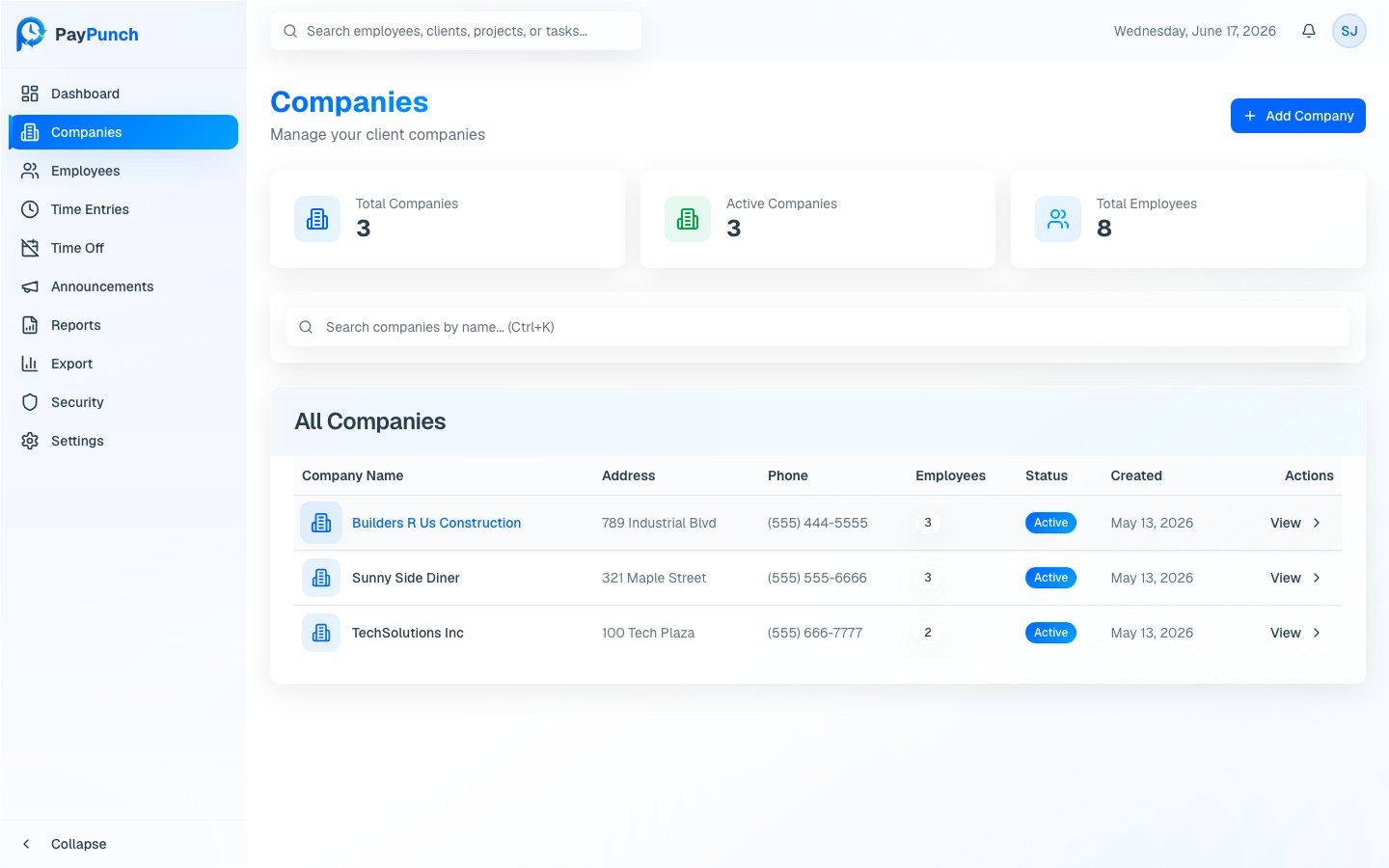
The Companies page
Open Companies from the sidebar. At the top you’ll see three summary cards — Total Companies, Active Companies, and Total Employees — followed by a searchable table of every company. The table lists Company Name, Address, Phone, Employees, Status (Active or Inactive), and Created date. Click any row, or the View button, to open that company’s detail page.Add a company
1
Open the dialog
Click Add Company in the top-right corner.
2
Fill in the details
Enter the Company Name (required). Optionally add an Address,
Phone, and choose an Industry from the dropdown.
3
Create
Click Create Company. The new company appears in the table immediately.
Only Company Name is required. You can fill in the address, phone, and
industry later from the company’s detail page.
View company details
From a company’s detail page you can review its profile and employees, and reach the company’s Job Codes. See Job Codes to set up cost codes for a company.Active vs. inactive
The Status badge shows whether a company is Active or Inactive. Inactive companies are not actively managed or billed, but their historical data is preserved. Use the search and the status column to keep your active client list focused.Where to go next
Set up job codes
Add cost and project codes per company.
Add employees
Build the company’s employee roster.