> ## Documentation Index
> Fetch the complete documentation index at: https://docs.paypunch.io/llms.txt
> Use this file to discover all available pages before exploring further.
# Settings
> Manage your company information, pay-period and overtime rules, timesheet submission deadlines, and QuickBooks details.
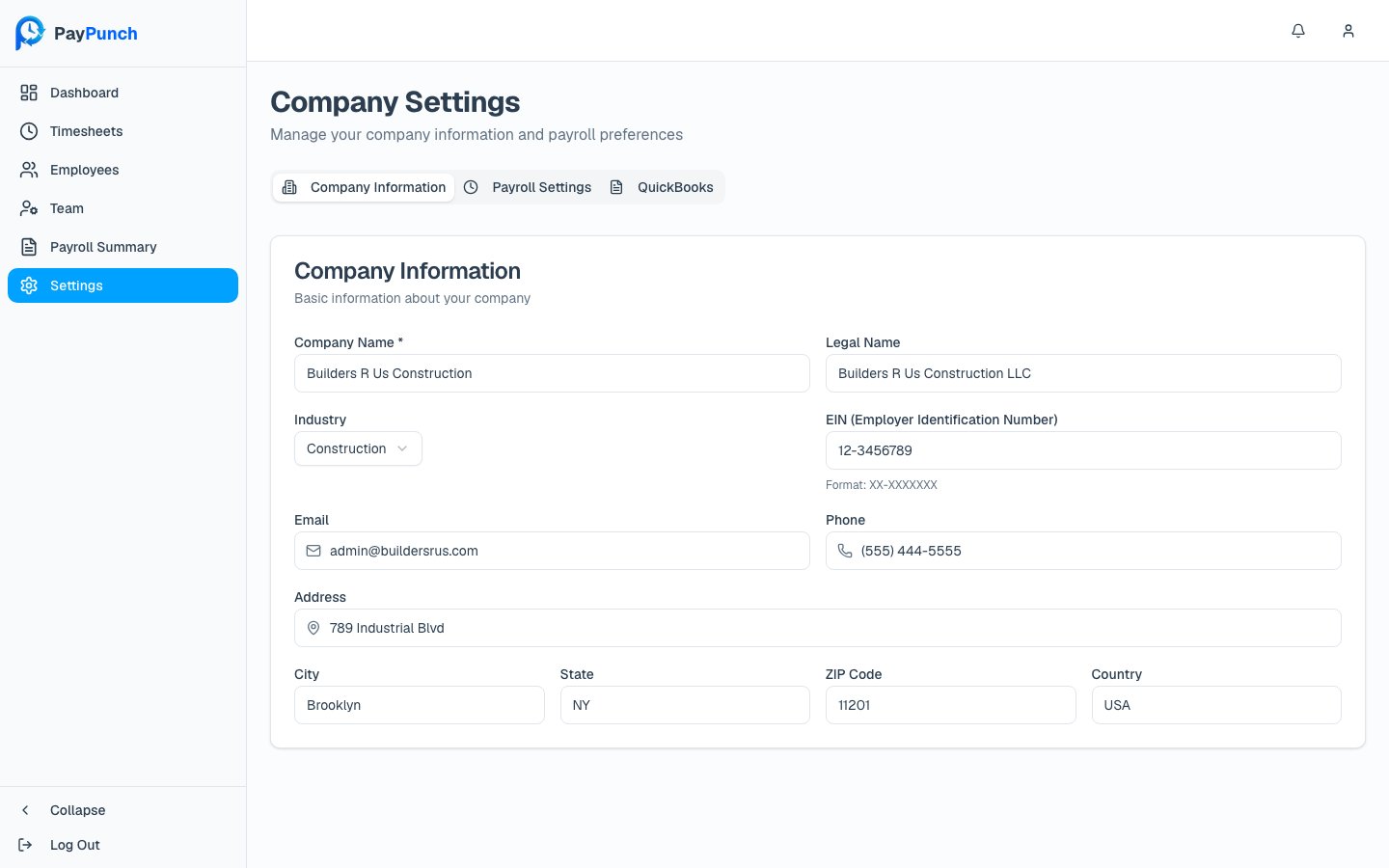
The **Settings** screen holds your company profile and the rules that drive payroll. The
header reads **Company Settings** — *"Manage your company information and payroll
preferences."* Settings are organized into three tabs.
 **Editing requires the Owner or Manager role.** A **Viewer** sees a banner — *"You have
view-only access to settings. Contact your company owner or manager to make changes"* —
with every field disabled and no save button.
## Company Information
Your company's identity and contact details:
* **Company Name** (required) and **Legal Name**
* **Industry** (chosen from a list)
* **EIN (Employer Identification Number)** — format `XX-XXXXXXX`
* **Email** and **Phone**
* **Address**, **City**, **State**, **ZIP Code**, and **Country** (defaults to USA)
## Payroll Settings
This tab sets how pay is calculated and when timesheets are due.
* **Pay Period Type** (required) — **Weekly**, **Bi-Weekly**, **Semi-Monthly**,
**Monthly**, **Manual** (admin creates periods), or **Contractor** (no regular
periods). This affects how pay periods are automatically generated.
* **Default Hourly Pay Rate** — the rate applied to new employees.
* **Enable overtime calculation** — when on, hours over 40 per week are calculated as
overtime at **1.5×** the regular rate.
* **Submission Deadline Time** — the time of day timesheets are due (e.g. `14:00`).
* **Days After Period End** — how many days after a period ends you have to submit
(0–7). Together these set the deadline shown on your [dashboard](/client/dashboard).
## QuickBooks
Details used when your bookkeeper exports your payroll to QuickBooks:
* **QuickBooks Company File Name** (e.g. `MyCompany.qbw`)
* **QuickBooks Customer ID** — your customer ID in the bookkeeper's QuickBooks
## Saving changes
A **Save Changes** button appears at the bottom right once you've edited something (and only
if you have edit permission). Click it — you'll see **"Settings saved successfully!"** If a
change affects an open pay period, PayPunch may show a warning explaining the impact.
Changing your **Pay Period Type** changes how future periods are generated. If you're
unsure how it interacts with periods already in progress, check with your bookkeeper
first.
**Editing requires the Owner or Manager role.** A **Viewer** sees a banner — *"You have
view-only access to settings. Contact your company owner or manager to make changes"* —
with every field disabled and no save button.
## Company Information
Your company's identity and contact details:
* **Company Name** (required) and **Legal Name**
* **Industry** (chosen from a list)
* **EIN (Employer Identification Number)** — format `XX-XXXXXXX`
* **Email** and **Phone**
* **Address**, **City**, **State**, **ZIP Code**, and **Country** (defaults to USA)
## Payroll Settings
This tab sets how pay is calculated and when timesheets are due.
* **Pay Period Type** (required) — **Weekly**, **Bi-Weekly**, **Semi-Monthly**,
**Monthly**, **Manual** (admin creates periods), or **Contractor** (no regular
periods). This affects how pay periods are automatically generated.
* **Default Hourly Pay Rate** — the rate applied to new employees.
* **Enable overtime calculation** — when on, hours over 40 per week are calculated as
overtime at **1.5×** the regular rate.
* **Submission Deadline Time** — the time of day timesheets are due (e.g. `14:00`).
* **Days After Period End** — how many days after a period ends you have to submit
(0–7). Together these set the deadline shown on your [dashboard](/client/dashboard).
## QuickBooks
Details used when your bookkeeper exports your payroll to QuickBooks:
* **QuickBooks Company File Name** (e.g. `MyCompany.qbw`)
* **QuickBooks Customer ID** — your customer ID in the bookkeeper's QuickBooks
## Saving changes
A **Save Changes** button appears at the bottom right once you've edited something (and only
if you have edit permission). Click it — you'll see **"Settings saved successfully!"** If a
change affects an open pay period, PayPunch may show a warning explaining the impact.
Changing your **Pay Period Type** changes how future periods are generated. If you're
unsure how it interacts with periods already in progress, check with your bookkeeper
first.